
The TimeBill blog
Freelance Timesheet Template: PDF with Automatic Totals
Updated on
A freelance timesheet should make a straightforward check possible: What work did you do, for which project, and when? How do the individual entries add up to the reported total? “Website, 8 hours” answers only part of that. A record of every mouse movement is not much help to the client either.
Here you will find a free PDF template, a fully worked example, and a process for turning individual work sessions into a timesheet ready to send. The focus is on client projects and preparing to bill for time worked.
Free freelance timesheet template as a PDF
Download the fillable timesheet PDF
The download contains two A4 pages: a template you can complete on your computer and a completed fictional example without form fields. The same PDF calculates times automatically in Chrome and can be filled in manually in macOS Preview. No registration or email required.
- Open. Use Chrome for automatic calculations or Preview to fill in the form manually. Automatic calculations require a compatible PDF reader with PDF JavaScript enabled; Acrobat Reader is an alternative (Adobe documentation).
- Fill in. Enter start and end times in 24-hour
H:MMorHH:MMformat. In Chrome, pressing Tab to leave a field calculates durations and the total to the minute, without rounding. In Preview, enter the values you calculate yourself. - Save. Save a completed copy; in Chrome, include your changes when downloading. Reopen it and check entries and results. Remove the example page before sending it to your client. You can share or print the finished PDF.
Filling in manually in Preview: All fields, including durations and the overall total, are editable. Calculate the times yourself and enter them as H:MM. Preview does not calculate automatically: if you change a start or end time, update the duration and overall total yourself.
Tips for automatic calculations
- Quick check: With automatic calculations active, a complete entry of
09:10–09:52should produce0:42. - Midnight: Use one date per row. Split overnight sessions at
24:00on the first day and00:00on the next.24:00is allowed only as an end time. - Missing or invalid details: An incomplete or invalid entry leaves the overall total blank. A message identifies the first affected row; empty rows are skipped.
- Longer periods: The total duration can exceed 24 hours.
When switching PDF applications: Opening a manually completed file in Chrome or another reader with automatic calculations active may recalculate durations and the total from the start and end times. Check the values afterwards. If automatic results do not update, use a compatible reader or calculate them manually; do not use outdated totals.
It is intended as a record of work provided to a client. In Germany, the employment-law requirement to record working time for employee protection is a separate use case. A client report does not automatically meet those requirements; see the German Federal Ministry of Labour and Social Affairs, source 1.
What makes a timesheet easy to check
Before preparing your first timesheet, ask what format your client needs. Adding a purchase order number, cost centre, or agreed activity category later often means another round of questions. The following details are a practical starting point, not a universal list of legally required fields:
- Identification: your name or business, client, project, and order reference where applicable.
- Period and version: the dates covered and the version being submitted, for example “5–6 October 2026, v1”.
- Work sessions: date, start, end, a clear description of the activity, and duration for each entry.
- A total that can be checked: an unambiguous time format and clear rules for breaks and rounding.
- Review: if agreed, the reviewer's name and review date, with separate feedback on disputed entries.
Each row should describe one continuous work session. If you interrupt it for a break or another client's work, that session ends. Whether particular waiting periods, meetings, or travel are billable depends on your agreement with the client. Neither a column heading nor a running timer decides that.
Describe activities your client can recognise
The description should make clear what you worked on. It does not need to be a technical log, and it should not claim that unfinished work is complete.
- Instead of “Development”: “Contact form: validated required fields”.
- Instead of “Meeting”: “Navigation review: documented outstanding decisions”.
- Instead of “Revisions”: “Proposal draft: revised scope following client feedback”.
If a task is still open, write something such as “Investigated form submission error; cause not yet identified”. Investigation is work too. The wording makes its status clear without implying that the problem has been fixed. Internal access credentials, private notes, and information about other clients do not belong in the description.
Worked example: three sessions, 2 hours 40 minutes
In this fictional example, a freelancer works on a contact form for a client's website. The parties have agreed to bill the three sessions by their actual duration. There is an unrecorded interruption between the first two entries.
- 5 October 2026, 09:10–09:52: Contact form: validated required fields. Duration 0:42, or 42 minutes.
- 5 October 2026, 10:15–11:28: Contact form: tested error handling. Duration 1:13, or 73 minutes.
- 6 October 2026, 14:00–14:45: Handover: documented changes. Duration 0:45, or 45 minutes.
42 + 73 + 45 = 160 minutes = 2 hours 40 minutes. The gap from 09:52 to 10:15 is not included. A single entry from 09:10 to 11:28 would include it and would be incorrect for this example.
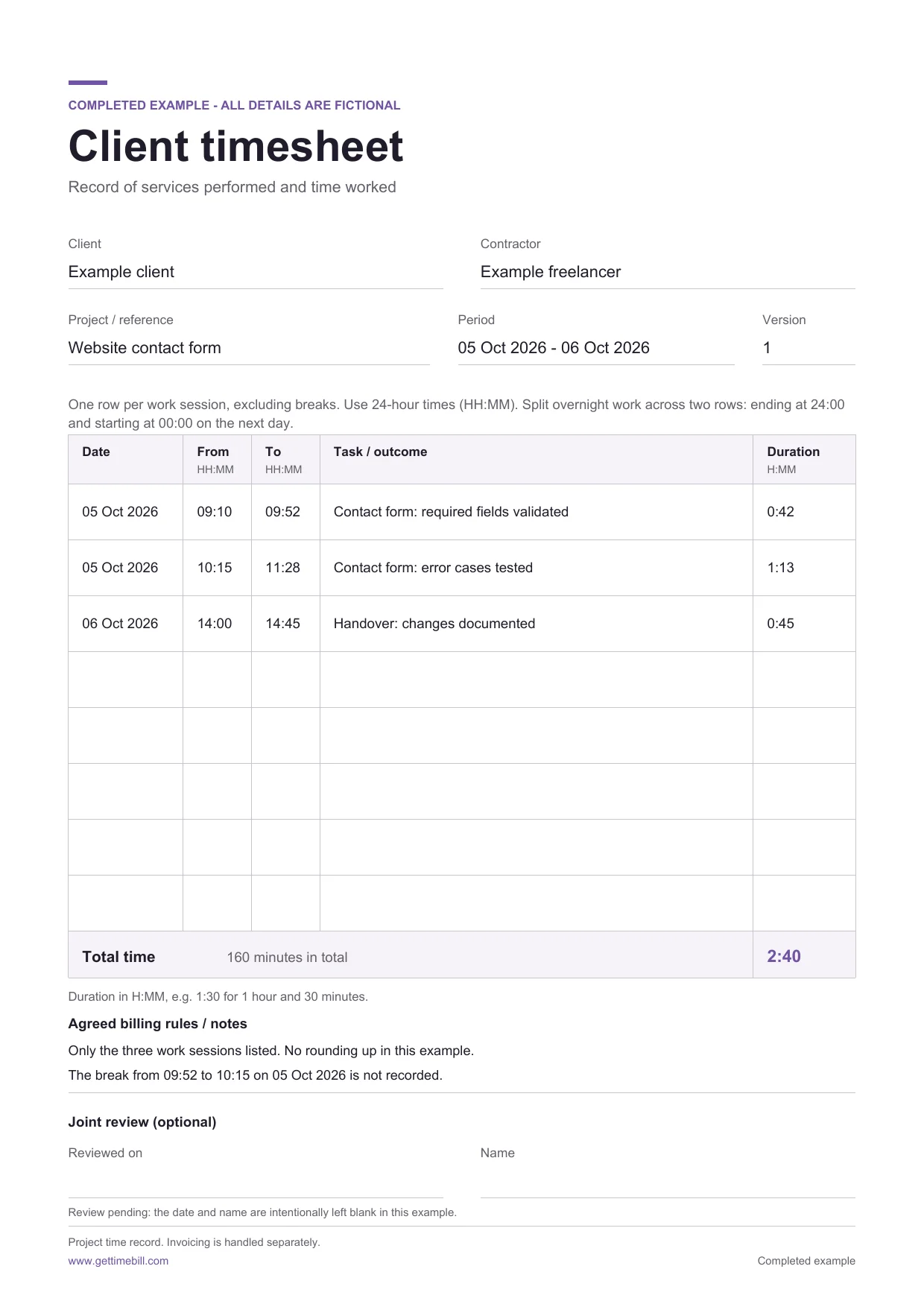
The second page of the downloadable template. The individual times and calculation also appear in the text above the illustration.
2:40 hours is not 2.40 decimal hours
In H:MM format, the number after the colon represents minutes. To convert to decimal hours, divide the minutes by 60: 2 + 40 / 60 = 2.666… hours, or 2.67 hours rounded to two decimal places. By contrast, 2.40 decimal hours is only 2 hours 24 minutes.
If you build your own spreadsheet, add the actual minutes first, then convert the total. Keep the unrounded value for further calculations. Rounding for display and rounding for billing are separate decisions.
A second example shows why: three sessions of seven minutes each add up to 21 minutes. Rounding each session up to the next full quarter-hour would produce 45 minutes. A rule like this should not arise accidentally from the choice of spreadsheet format. Explicitly agree whether to round, in which direction, and at what level: per entry, per day, or only for the overall total.
Why you should not reconstruct the whole week from memory
In 2019, Walthery and Gershuny compared broad estimates of working time with seven-day diaries from two British time-use studies. The analysed samples included 4,375 and 2,986 working people respectively. Differences ran in both directions: long weeks tended to be overestimated and short weeks underestimated. The diaries were also self-reported; the research did not examine client invoices or TimeBill. Original study, source 2.
In 2025, Hart, Warren, and Edwards also examined 105 programming submissions from 33 students. Self-reported times differed from a model's estimates of task duration based on keystroke events. Work done before the first keystroke event may be missing from this model. The finding therefore also highlights a question of definition: which activities count as the work being measured? It does not establish a particular error rate in freelance invoices. Original study, source 3.
The American Time Use Survey (ATUS) provides an example of structured reconstruction: an interviewer records the previous day's activities in sequence, along with their times. This is a data-collection method, not evidence of a particular app's accuracy. Bureau of Labor Statistics methodology, source 4.
Our practical recommendation from this evidence is to record specific work sessions promptly and check their boundaries, rather than entering a plausible weekly total on Friday. If an entry is missing, use your calendar, files you sent, and project notes as reference points. A commit timestamp or an email establishes a point in time, not necessarily an uninterrupted period of work. Label any remaining estimates and resolve them before billing instead of creating false confidence by expressing them to the minute.
Keep recorded, billable, reviewed, and invoiced work distinct
A timesheet initially records time and activities. Before those entries become an invoice, you need to make further decisions:
- Recorded: the work session took place and belongs to the correct project.
- Billable: the work can be charged under your agreement. Time spent reviewing project profitability or making a correction you promised at no charge can be recorded without belonging on the invoice.
- Reviewed: you have checked the entries and the total. If you agreed on a client review, also record its outcome.
- Invoiced: the relevant time has been included in a specific invoice. Exporting the timesheet again must not accidentally result in billing it twice.
These are checks for your workflow, not a promise that every time-tracking app manages these states automatically. On a fixed-price project, the same time record can help you review your costs; it does not automatically turn the agreed fee into hourly billing. For the invoicing process, see our guide to invoicing for freelancers.
Before sending: six specific checks
- Are any timers still running? Stop them before documenting a completed period.
- Do entries overlap? Pay particular attention to switching projects. Two timers running in parallel do not automatically produce two billable hours.
- Are the period and dates correct? Exclude dates outside the intended reporting period. If a session crosses midnight, its date allocation should also make sense to the recipient.
- Have breaks and rules been applied correctly? Check actual interruptions, agreed billable activities, and the level at which rounding is applied.
- Do the entries, total, and invoice reconcile? Check previously invoiced time and rounding differences in particular. Explain discrepancies instead of silently changing the records to make them match.
- Can the client understand every item? Check project references and activity names, remove unnecessary internal information, and open the finished PDF yourself.
If a correction is needed, send a clearly identified new version, such as ContactForm_2026-10-05_to_2026-10-06_v2.pdf, and explain the change in the accompanying message. Keep the previous version. That makes it possible to establish which total was submitted for review and when.
Create timesheets on your Mac with TimeBill
For occasional timesheets, the template is enough. If you regularly work across several client projects, exporting your recorded time avoids copying it out again. In TimeBill for Mac, you create projects and tasks, then record work with a timer or manual entries. The time-tracking guide also explains how to correct entries afterwards.
One detail matters for the PDF export: TimeBill exports the time entries for the selected project. There is no month filter or filter for only billable or not-yet-invoiced entries. Check that the project's contents match the timesheet your client expects. For a monthly timesheet drawn from a longer-running project, you need to compile the relevant entries separately, for example in the template above.
To export a project's timesheet:
- Stop running timers and check the entries. Give tasks names your client can understand: the timesheet shows task names, not the additional notes attached to individual time entries.
- Select the project and open File → Export → Export Timesheet (PDF). Menu labels follow your app's language.
- Choose the paper format in the save dialog. Review the option to round the final total to five minutes, which is enabled by default. It does not round every start and end time. The optional signature lines are printed lines for the client and contractor, not an electronic approval process.
- Save the PDF and check it before sending. If you then create an invoice, also compare its rounding and the time included. Exporting the timesheet does not itself change any billing states.
The full timesheet export guide explains the options. Timesheet export is also available without a watermark on the free plan; that plan's project and task limits still apply. You can download TimeBill, record a real work session, and compare the resulting project timesheet with the template.
Sources
The studies inform the discussion of measurement and memory. The template, calculations, and checks are our practical guidance, not a scientifically validated billing method. Research checked on 11 October 2026.
- German Federal Ministry of Labour and Social Affairs (2025). Questions and answers on working-time recording (in German). Context on employee protection in Germany; updated 8 August.
- Walthery, P., & Gershuny, J. (2019). Improving Stylised Working Time Estimates with Time Diary Data: A Multi Study Assessment for the UK. Social Indicators Research, 144, 1303–1321.
- Hart, K., Warren, C. M., & Edwards, J. (2025). Time-on-task estimation for tasks lasting hours spread over multiple days. PLOS ONE, 20(9), e0330758. DOI: 10.1371/journal.pone.0330758.
- U.S. Bureau of Labor Statistics. American Time Use Survey: Data sources. Handbook of Methods.